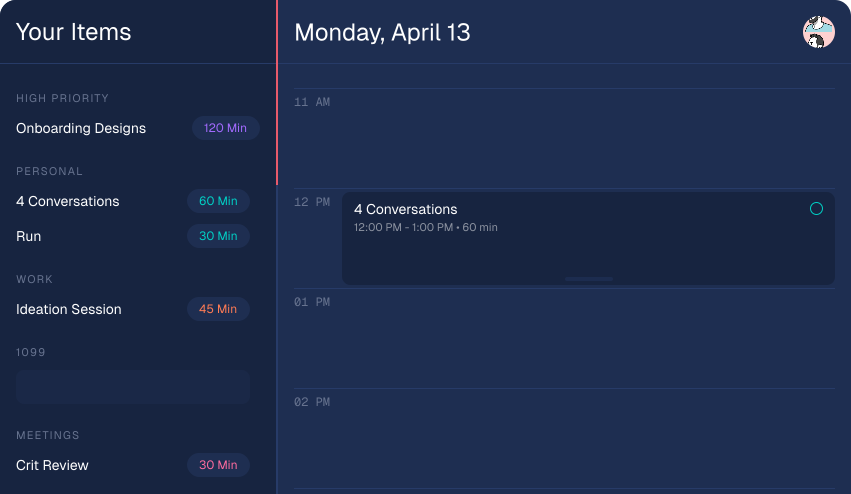
Timeboxed day planning
Plan your real day,
Plan your real day,
not a fantasy to-do list.
Add task durations, drag them onto a timeline, and build a day you can actually finish.
Add task durations, drag them onto a timeline, and build a day you can actually finish.
To-do lists lie by omission. They happily accept your 37th task without mentioning that the day has run out. By 4pm you feel like you failed. You didn't fail. You overbooked.
Text files and checkboxes never push back. They treat a 10-hour day and a 10-minute day identically.
"Redesign landing page" sits next to "reply to Jamie" like they cost the same. One takes hours. One takes minutes.
Your calendar takes the morning. Your list pretends it did not. Then 6pm hits and you wonder where the day went.
You do not need more features. You need to look at today and think: yeah, I can do that.
No projects. No tags. No priority matrices. Just tasks with durations, on a timeline you can move with your cursor.
Group into categories — work, personal, meetings. Each task gets a duration in minutes. That's the rule.
Grab a task, drag it to the timeline. It snaps to 15-minute slots.
Stretch a task and the rest of your day shifts. Hold shift to ripple everything below.
Complete tasks as you do them. No streaks, no shame. Just clarity.
Why it exists
Time is the honest variable — a timeline makes it visible, so deep work gets room before the day runs out.
You do your best work in long, uninterrupted stretches. Hey Today helps you protect those stretches, enter flow faster, and stay there long enough to finish meaningful work.

I built Hey Today because I kept writing 12-item lists and finishing five of them. I had not failed. I had overbooked.
The only thing that worked was putting tasks on a timeline and letting time tell me what was realistic.
I hope this helps you. It is not for everyone, but if you are a maker who wants more days spent in real flow, I hope Hey Today helps you find that state more often.
Hey Today is for makers who do their best work in focused blocks: designers, writers, developers, and founders. If you want detailed project management or heavy team workflows, it is probably not the right fit.
To-do apps collect tasks. Calendars manage meetings. Hey Today helps you plan realistic work blocks by assigning duration and placing tasks on a timeline, so your day matches your actual time.
Usually about 2-5 minutes. Add a few tasks, estimate duration, drop them on your timeline, and adjust until the day feels realistic.
Yes. Hey Today is designed to fit around your existing commitments and planning habits, not force a full workflow replacement.
That is expected. You can drag, resize, and re-sequence tasks quickly so your plan stays realistic as meetings shift and new priorities appear.
Give the rest of it a shape. It takes about two minutes to plan a day you can actually finish.
Start planning — it's free